
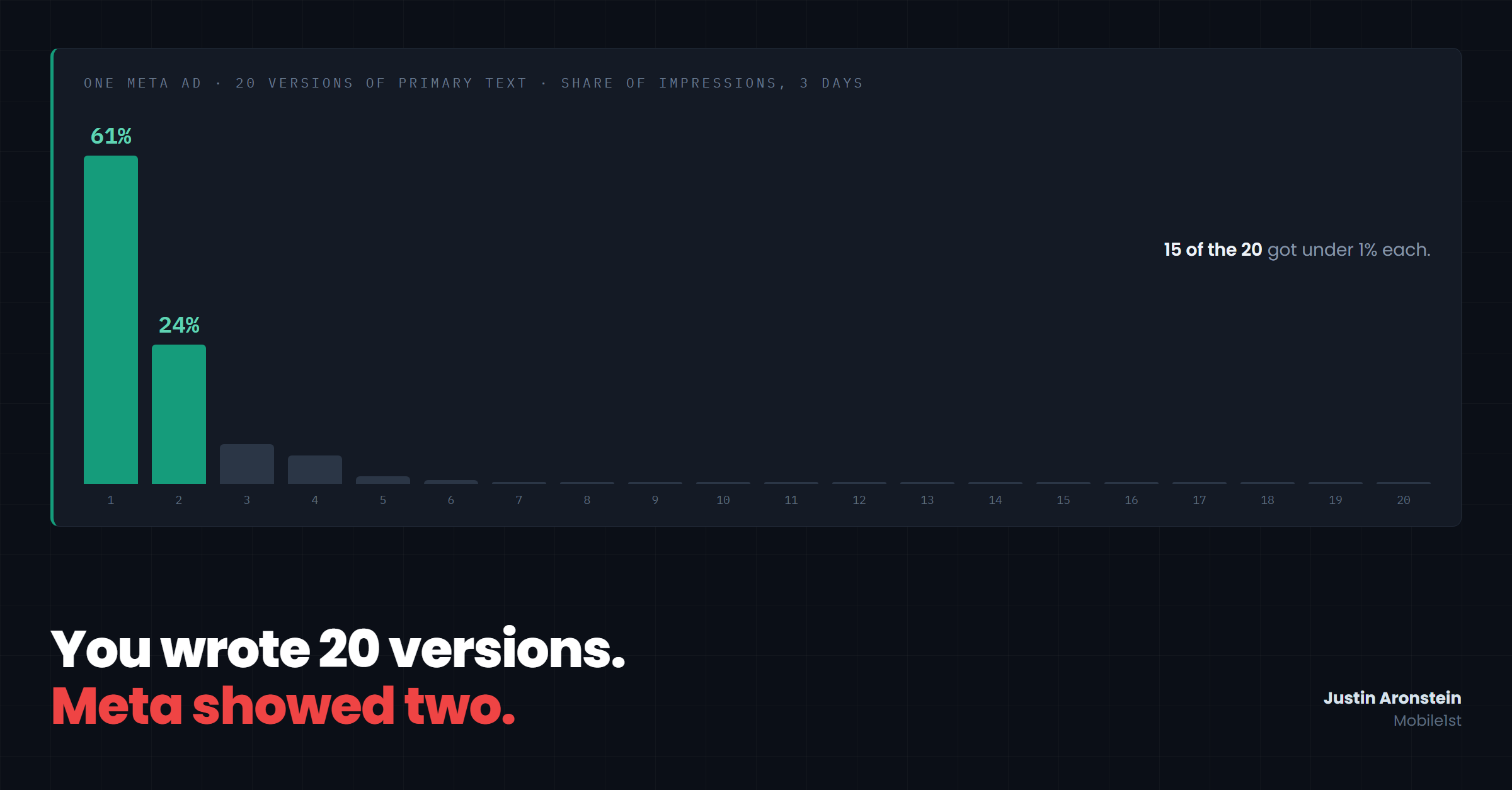
One of our clients loaded 20 versions of primary text into a single Meta ad. Over the next three days the top version got 61% of the impressions and the second got 24%. The other 18 split what was left, and 15 of them got less than 1% each.
Somebody wrote those 15. Probably in a doc with a comment thread about tone. Meta showed them to almost nobody.
It's the usual pattern. We read the asset-level delivery for every dynamic and flexible-format ad our clients run, because our product needs to know which version of an ad a person actually saw. On ads with more than one image, the most-shown image gets a median of 80% of impressions. On a typical ad with several headlines, more than half the headlines get under 5%. One ad had ten images: two of them took 91% and the other eight shared 9%. Another had six images across 36,000 impressions, and one image got 80% of them.
How Meta picks
Every time someone opens Facebook or Instagram, Meta runs an auction for that ad slot. It estimates how likely this specific person is to do the thing you're optimizing for, and it makes that estimate for each version of your ad it could show. Then it shows the version it's most confident about.
The estimate comes from what it has already seen. A version that got shown early and picked up a few clicks has data behind it. A version that barely ran has almost none, so the system has little reason to believe in it and keeps passing it over. The early leader gets more impressions, which gets it more data, which makes the system more sure of it. That loop is how you end up with the numbers above.
It's a sensible way to spend your budget if the goal is conversions this week. As a way to learn anything, it's garbage. Meta is optimizing for its own prediction, and it has zero interest in giving your sixth headline a fair trial.
No campaign structure or toggle gives you a vote in which version shows. You decide what goes on the shelf, and it decides what gets picked off it, per person, for its own reasons. So the work is all in what you put on the shelf.
How to find and replace the versions Meta isn't showing
-
Find out what actually ran. Open your highest-spend flexible or dynamic ad and pull delivery by asset: it's in Ads Manager's breakdown menu, and in the API as
image_asset,title_assetandbody_asset. Use at least a week of data and sort each list by impressions. -
Draw a line at 5%. Any version under it never really played. Ignore its CTR and ROAS, because a few hundred impressions can't tell you anything, and you've learned nothing about whether it was any good.
-
Read the starved versions next to the winner. Usually they make the same promise in different words. That's why they lost: Meta picks the version it thinks fits each person, and five rewrites of one promise give it nothing different to match against a different buyer. (Here's how to tell if your 100 ads are really one ad.)
-
Replace them with a different reason to buy. Write each new version around a different problem the product solves or a different offer, so it has a shot at a buyer the winner doesn't reach. Leave the winner alone. Editing it can send the ad back through Meta's learning phase, and it's the version doing the work.
-
Re-read after a week. A new version still under 5% is Meta's answer for now. Swap it for the next idea instead of rewording it.
-
When you need an actual answer, take it out of the pile. If you want to know which of two angles sells better, put them in separate ads and run Meta's A/B test tool, which forces an even split. Inside one flexible ad you'll only ever learn which one Meta preferred.
-
Brief and report on the version that's running. If one image gets 80% of the impressions, that image is your ad. It's the one your landing page should match and the one your report should show, even if it wasn't your favorite in the review meeting.
Our part in this
We started pulling asset delivery because our pages need to match what a visitor actually saw. "The ad" turned out to be a stack of versions where one did nearly all the talking, and we'd been treating every version as if it ran.
A caveat on our numbers: each read covers a recent window of three to fourteen days for a live ad. It's a snapshot of what delivery was doing that week, and a starved version might get its turn later.
Go open your highest-spend flexible ad and pull the asset breakdown. If your impressions are spread evenly across your versions, send it to me. I haven't seen one yet.