
The View to Buy Report: The One Report That Will Save Your BFCM Week
Insights that Guide You
Are you struggling to pinpoint where to focus? Stuck just guessing? You’re probably not looking at the right reports. Most e-commerce teams aren’t. Want to figure out the right reports? I can solve that for you. Schedule a time here
Why This Report Matters More Than Your Funnel
You are going to be refreshing your funnel reports every five minutes next week like they personally wronged you. You will watch people add to cart, abandon, return, scroll around, and then vanish to go price-shopping somewhere else. Everyone obsesses over Added to Cart and Checkout Started, but the quieter, more important truth is hiding somewhere else entirely. The report you should be glued to is your Product View to Buy report. It tells you which products are attracting traffic, which ones are driving actual orders, and which ones are silently setting your money on fire while you keep sending more visitors to them. In the chaos of BFCM, this report becomes your flashlight. Read the rest to see how I generate the data in GA4, and download my Excel template here.
What the Product View to Buy Report Actually Tells You
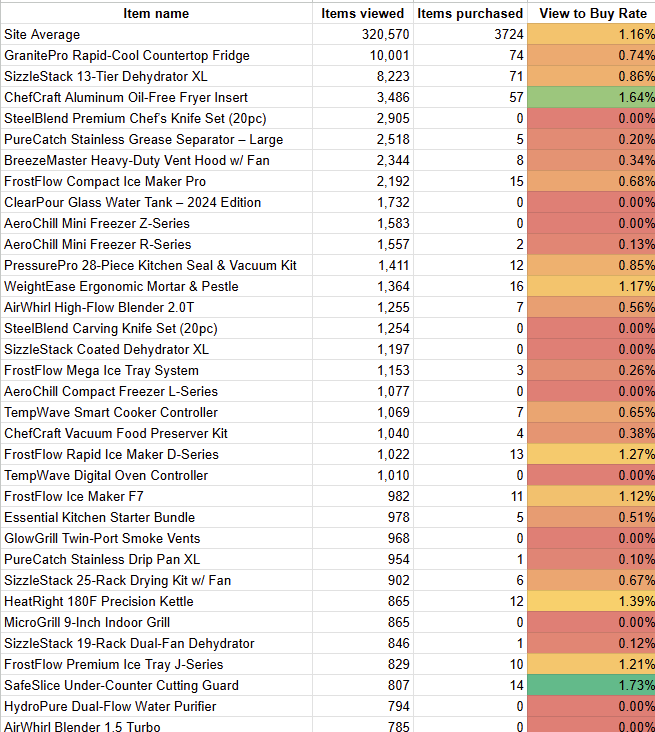
This report is deceptively simple. It surfaces views, purchases, and the ratio between them. But that ratio is the heartbeat of your merchandising strategy. If a product is being viewed hundreds or thousands of times without anyone buying it, you need to know that immediately, not after the weekend when your paid budget is already gone. And if a product with strong margins has a high conversion rate but barely any traffic, it deserves a bigger spotlight. This report helps you decide what to promote, what to fix, and what to stop spending money on. It highlights which products genuinely matter for revenue and which are dead weight no matter how pretty they look in your catalog.
How to Build This Report in GA4
Start by creating a new blank exploration in GA4. Add Item Viewed and Purchases as your metrics. Add Item Name as your primary dimension. Drag Item Name into Rows, add your two metrics, and export the whole thing to Google Sheets. This is where the report becomes actionable. In Sheets, create a new conversion rate column using Purchases divided by Item Viewed. Clean up the sheet by deleting the first five rows so your data starts cleanly at the top. Then manually insert a Site Total row in A2, which gives you a baseline for the average conversion rate. Format the conversion column as a percentage so the numbers are easy to scan without mental gymnastics.
Turning Your Sheet Into Something That Actually Helps You
Your report is already sorted by views, but you need to isolate the products that matter. I suggest focusing on items with at least one hundred views, although your threshold may vary depending on your traffic levels or catalog size. Once you have the meaningful set, turn the conversion rate column into a visual map so your brain can quickly see what needs attention. Use Format, Conditional Formatting, Color Scale, and apply a red to green scale with yellow in the middle. Set red to zero and set the midpoint as the site average. Suddenly your underperformers show up in bright red, the average performers hover around yellow, and your winners light up in green.
What To Do With the Red Products
These red products are where you should invest your time. Begin by checking traffic sources. If most of the traffic is coming from paid channels like Google Shopping and the conversion rate is terrible, pull this product from your feed immediately. BFCM is not the time to donate budget to products that refuse to earn their keep.
Next, review the product page itself. Can you upgrade the images quickly? Can you rewrite the copy to make benefits stronger and more obvious? Can you tighten the bullet points so the customer understands the value faster? Customers during BFCM shop like they are sprinting. If your product page does not answer their questions immediately, you should not expect miracles.
Finally, look outside your four walls. Go to Google and search the product category the way a normal shopper would. What are the cheaper alternatives? What objections are obvious? What competitors emphasize? This exercise forces you to confront the actual value of your product, not the version you created in a meeting six months ago. If you cannot clearly justify why your product is worth its price, your shoppers certainly will not try to figure that out for you.
The Real Reason Conversion Rates Don’t Move
You can spend all day obsessing over UX improvements, shaving seconds off load times, or adding more trust badges to the page. None of that will save a product with a weak value story. Conversion rate is a function of perceived value, not button color. If the product does not feel worth the price, your conversion rate will stay low no matter how many optimizations you stack on top of it.
The Bottom Line
Focus on the red products. Fix them if they can be fixed, promote the green ones more aggressively, and stop paying for traffic that goes nowhere. If you can do that, your BFCM week becomes less stressful, less expensive, and significantly more profitable.
We’re taking next week off, but if you have any questions you want answered, we’ll answer them in our next newsletter. Just reply to this email, and ask away.
Want more?
Make your job easier, let Mobile1st Grow RPV for you
At Mobile1st, we help e-commerce brands grow revenue per visitor.
We do it by combining customer-first research with testing and experimentation that cuts through the noise of dashboards and opinions. Our team uncovers what really drives purchase decisions, then runs experiments to prove impact — so you can stop guessing and start scaling
Want help? Reach out.

Want to be featured on Checkin to Checkout?
Send an email to justin@mobile1st.com, and we’ll set up a time to get to know you to see if you’re a great fit. We’re always looking for e-commerce leaders to feature on Checkin to Checkout
